
PROSE 3 - Muhammad Yunus


SUMMARY

Early life:
Yunus was born on 28 June 1940 to a Muslim family in Hathazarai, Chittagong. In 1940, that was part of British-controlled India. But, after independence in 1947, became East Pakistan. (and later Bangladesh)
Yunus was an excellent student, becoming one of the best students in the year at Chittagong Collegiate School, and later Chittagong College. He completed a BA degree in economics at Dhaka University in 1960, and his MA in 1961.
After graduation, he taught economics at Chittagong College and served as a research assistant under Nurul Islam. In 1965 he gained a Fulbright scholarship to study in the UN. Later in 1971, he gained a PhD in economics from the Vanderbilt University Graduate Program in Economic Development. He also worked as an assistant professor of economics at Middle Tennessee State University.
In 1970, he met Vera Forostenko a Russian immigrant to the US. They had one child, Monica Yunus, but Vera did not want to live in Bangladesh and the couple split. Yunus later married Afrozi Yunus, and they had one daughter Deena Afroz Yunus.
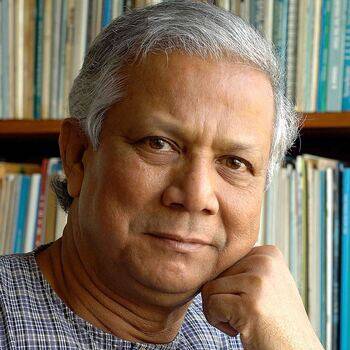
 Muhammad Yunus is a Bangladeshi banker and recipient of the Nobel Peace Prize (2006). Yunus is credited with developing the concepts of microfinance and microcredit. These are schemes which offer small loans to the rural poor – to enable them to invest and lift themselves out of poverty.
“When we want to help the poor, we usually offer them charity. Most often we use charity to avoid recognizing the problem and finding the solution for it. Charity becomes a way to shrug off our responsibility. But charity is no solution to poverty.

Yunus decided to lend some of his own money to 42 women in the village of Jobra, near Chittagong. It was only a total of US$27, and he was repaid with a profit of $0.02 on each loan. This convinced him microloans were a viable business model.
Video Lecture Links:


Contents 1  2  3  4  5  6  7  8  9  10
 

Comments

Popular posts from this blog

Unit II

2.1 What Are Web Directories? Web Directories  are also known as link directories which are very much concerned with the website’s listings in their index. In olden days, I mean in the past decade, web directories had a great value in the sense of search engines. Because whenever people type queries in search engines, these search engines often consult with the web directories for updated information. All Directories sites follow a layered approach while listing the website i.e, the first one is the main category then followed by the subcategory and then another subcategory until there came a suitable one. Various Features of Web Directories Listing There are various features while listing the websites which depends on the price and duration. These features include: Free submission  – these are free and nothing is charged for review and listing of the submitted links while it takes at least 3 to 6 months while getting listed Reciprocal link  – th...

Unit IV

4.1 Google Drive  Google Drive is a free cloud-based storage service that enables users to store and access files online. The service syncs stored documents, photos and more across all of the user's devices, including mobile devices, tablets and PCs. Google Drive integrates with the company's other services and systems -- including Google Docs, Gmail, Android,  Chrome , YouTube,  Google Analytics  and Google+. Google Drive competes with Microsoft OneDrive, Apple iCloud, Box, Dropbox and SugarSync. Features Of Google Drive Your stuff, your way – Drive Features. 15 GB space. Keep any file. Share how you want. ... Built to work with Google. Save Gmail attachments. Powerful search. Google Photos. ... Work smarter with apps. Docs, Sheets, Slides. Google Forms. ... Take Drive even further. Scan documents. Work offline. Uses Of Google Drive:  1. Backup Your Precious Files Do you have photos of a family vacation that mean t...

Internet & www - II - Index

Table of Content: Unit I: Click here 1.1 Web Browsing: History of web Browsers, Basic Functions of Web Browser, and Types of Web Browsers. 1.2 Features of Internet Explorer, Google Chrome, Mozilla Fire Fox, UC Browser and Opera Mini Unit II: Click here 2.1: Web Directory: Meaning of Web Directory, Features of Web Directory, Types of Web Directory. 2.2: Search Engines: Meaning of Search engines, the history of search engines, the guideline for effective searching. 2.3: Features of Google, Bing and Yahoo Search engines Unit III: Click here 3.1: Social Networking Websites: Meaning of social networking website, Features of Social networking websites, objectives of the social networking website. Features of Facebook, Instagram and Tweeter Website. 3.2: Mobile Applications (App): Meaning of Mobile App, Features of Mobile App, Feature of What’s App, Google Play Store and BHIM App. Unit IV: Click here 4.1: Google Drive: Meaning of Google Drive, Features and Use...